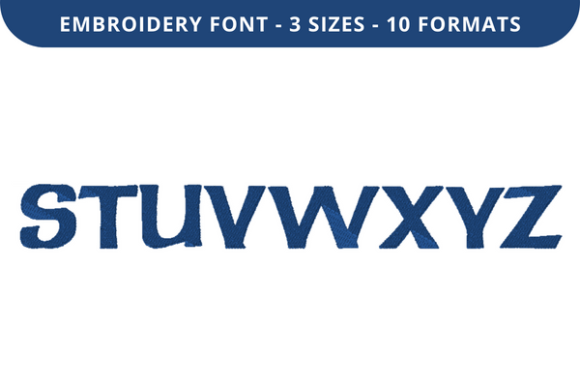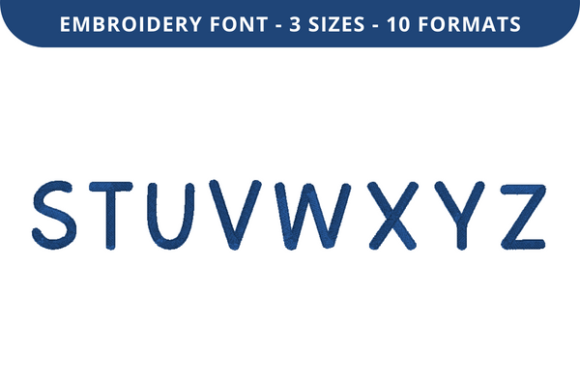
Cloudbird Font S to Z
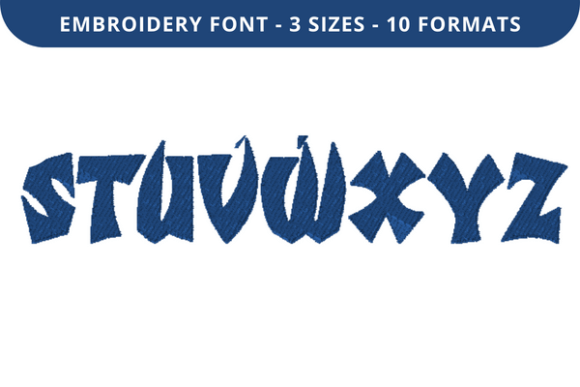
Cloudbird Font S to Z is a specialized machine embroidery font designed for stitching letters from the letter S through Z—complementing its counterpart, Cloudbird Font A to R. Together, they form a complete uppercase alphabet set optimized for embroidery machines. Unlike standard digital fonts, Cloudbird Font S to Z is digitized specifically for stitch stability, thread efficiency, and clean edge definition on fabric. It is not a TrueType or OpenType font for screen use; rather, it is a collection of embroidery design files intended for direct loading into embroidery machines or editing software.
This font is commonly used to personalize apparel, home textiles, and commemorative items with names, dates, initials, short quotes, or monograms. Its design prioritizes legibility at small to medium sizes (typically 1–3 inches in height), with balanced letter spacing, consistent stitch density, and minimized underlay where appropriate to reduce fabric distortion.
Why Consider Cloudbird Font S to Z?
Embroiderers often seek reliable, ready-to-stitch alphabets that eliminate the need for manual digitizing—a time-intensive process requiring technical knowledge. Cloudbird Font S to Z offers a practical solution for users who want consistent, machine-ready letters without investing in custom digitizing services. It is especially relevant for crafters, small-batch makers, or hobbyists who frequently add text-based elements to projects but lack advanced digitizing skills.
Its appeal also lies in versatility across materials: it performs well on stable woven fabrics like cotton twill and linen, as well as moderately stretchy knits when stabilized appropriately. Users report successful results on tote bags, baby onesies, towels, and quilt labels—provided fabric preparation aligns with the font’s stitch characteristics.
Key Benefits and Realistic Expectations
One primary benefit is format compatibility. Cloudbird Font S to Z typically ships with multiple embroidery file formats—including .dst (Tajima), .pes (Brother), .jef (Janome), .exp (Melco), and .vp3 (Viking). This broad support reduces the need for conversion and increases the likelihood of seamless use across different machine brands.
Another advantage is predictability. Because each letter is pre-digitized and tested, users can expect uniform stitch count, consistent jump thread placement, and repeatable outcomes—valuable when producing multiples, such as matching sets or event giveaways.
However, expectations should remain grounded. Cloudbird Font S to Z is not scalable infinitely: enlarging letters beyond recommended dimensions (often ~3.5 inches) may reveal stitch gaps or uneven fill density. Shrinking below ~0.75 inches can cause thread breaks or poor registration, particularly on low-tension machines or delicate fabrics. It also lacks lowercase letters, numerals, or punctuation—meaning users must source or digitize those separately if needed.
Practical Considerations Before Use
Before incorporating Cloudbird Font S to Z into a workflow, consider three practical factors: machine capability, stabilization strategy, and design context.
- Machine capability: Verify your machine supports the included file formats. Some entry-level models only read one or two formats natively; others require USB transfer or specific software. If your machine does not support a provided format, third-party conversion tools exist—but conversions carry a small risk of stitch path alteration.
- Stabilization strategy: This font uses satin-stitch outlines and dense fill areas. Medium-weight cutaway or tear-away stabilizer is generally recommended for most applications. For lightweight or stretchy fabrics, combining stabilizers (e.g., cutaway backing + lightweight topping) helps prevent puckering and ensures clean letter edges.
- Design context: Cloudbird Font S to Z works best for standalone text or minimal compositions. It is not intended for complex layouts with overlapping graphics or tight kerning adjustments—those require manual editing in embroidery software. If your project involves tight curves, vertical text stacks, or integration with intricate motifs, evaluate whether the font’s fixed spacing meets your aesthetic goals.
When Cloudbird Font S to Z Is a Strong Fit
This font suits users whose primary need is efficient, consistent lettering for straightforward personalization tasks. Examples include:
- A small business embroidering children’s clothing with first names and birth years;
- A quilter adding embroidered labels to finished pieces using standard-size lettering;
- A school or community group producing event-themed tote bags with participant names;
- A hobbyist building a reusable library of machine-ready text elements for seasonal projects.
In these cases, the time saved by skipping digitizing—and the reliability of tested stitch paths—often outweighs the limitations of fixed character design.
When Alternatives May Be Worth Exploring
Cloudbird Font S to Z may be less suitable in certain scenarios. For instance, if your work regularly requires lowercase letters, numbers, or special symbols, you’ll need to supplement it with additional fonts or custom digitizing—potentially increasing complexity and cost. In such cases, a full-coverage embroidery font bundle (including A–Z, 0–9, and common punctuation) might offer better long-term value.
Likewise, if you frequently adjust letter spacing, slant, or width—or integrate text dynamically with vector-based artwork—you may benefit more from a vector-based embroidery font system that allows real-time scaling and editing within software like Wilcom, Embrilliance, or Hatch. These platforms let users generate custom text with precise control, though they demand more learning time and software investment.
Finally, if your projects involve highly textured or unstable substrates—such as fleece, velvet, or unbacked mesh—Cloudbird Font S to Z’s standard density may require manual tweaks. Embroidery digitizers sometimes modify underlay, pull compensation, or stitch angle for such materials; users without editing access may find results inconsistent without those adjustments.
Making an Informed Decision
To determine whether Cloudbird Font S to Z aligns with your needs, ask yourself:
- Do I primarily embroider uppercase letters at standard sizes (1–3 inches) on stable fabrics?
- Do I prefer plug-and-play files over learning digitizing tools or managing conversions?
- Am I comfortable sourcing or creating separate files for numbers, lowercase, or punctuation if needed?
- Do my current machine and software support at least one of the included formats without error-prone conversion?
If most answers are “yes,” Cloudbird Font S to Z is likely a practical addition. If several are “no,” explore alternatives—such as comprehensive font collections, built-in machine fonts, or beginner-friendly embroidery software with auto-digitizing text features.
Ultimately, the value of Cloudbird Font S to Z lies not in novelty or visual flair, but in functional reliability. It serves a specific purpose well: delivering consistent, machine-ready uppercase letters S through Z for everyday embroidery tasks. Understanding its scope—and its boundaries—helps ensure it supports your goals without unexpected friction.