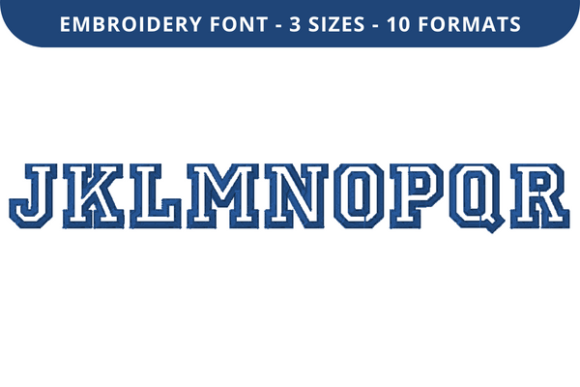
College Outline Font J to R
If you're stitching names, monograms, or meaningful dates onto apparel, tote bags, or home textiles, College Outline Font J to R is a go-to embroidery font for clean, classic lettering. It’s not just decorative—it’s engineered for clarity and consistency across fabric types and stitch densities. Designed specifically for machine embroidery, this high-quality outline font delivers crisp edges and balanced spacing from J through R, making it ideal for personalization projects where legibility and charm matter equally.
Why This Font Stands Out—And Why That Matters
Unlike generic block fonts or overly ornate scripts, College Outline Font J to R strikes a thoughtful balance: it reads instantly at small sizes yet holds presence at larger scales. Its open outlines reduce thread buildup, minimizing puckering on lightweight cottons or knits—something many beginners overlook until their first test run fails. Two precise sizes are included (typically 1.5" and 2.5" cap height), so you’re not forced to scale manually and risk distortion or stitch density issues.
The file package includes multiple industry-standard formats (.dst, .pes, .jef, .exp, .vp3), meaning it works seamlessly with Brother, Janome, Bernina, Husqvarna Viking, and most mid- to high-end embroidery machines. No conversion headaches. No guesswork about compatibility.
A Common Misstep: Assuming All “Outline” Fonts Behave the Same Way
Not all outline fonts are built for embroidery. Some are digitized for screen display only—thin lines that vanish when stitched, or inconsistent stroke widths that cause skipped stitches or thread breaks. College Outline Font J to R was created by experienced digitizers who understand how needle penetration, fabric tension, and underlay behave in real-world conditions. That’s why its strokes maintain minimum width thresholds (usually ≥0.6mm) and include strategic jump stitches and tie-offs.
Real example: A hobbyist bought a free “college-style” font online, scaled it to 2", and tried stitching on a baby onesie. The thin “J” hook vanished mid-stitch, and the “R” leg collapsed into a blob. Why? The original wasn’t digitized for stability—it had no underlay, no density control, and no fabric-specific optimization. College Outline Font J to R avoids this because every letter is tested across common substrates—not just simulated on screen.
Overlooking File Format Compatibility—Until It’s Too Late
You might own a Janome machine but download only the .pes file—only to discover your software doesn’t recognize it without conversion. Or worse: you assume one format fits all, then spend hours troubleshooting a corrupted stitch path. College Outline Font J to R sidesteps this by delivering *all* major formats in one package. Still, always verify which format your machine or software prefers—and confirm your embroidery software can open it *before* starting your project.
Tip: If you use Embrilliance or Hatch, check whether your version supports .vp3 or .jef natively. Don’t wait until you’re mid-hoop to learn your trial software limits file imports.
Scaling Without Strategy—A Silent Quality Killer
This font comes in two optimized sizes—but some users try stretching it beyond those ranges. At 3", for instance, the outline may become too wide, causing dense fill areas or uneven satin coverage. At 1", fine details like the crossbar of “R” or the curve of “J” may lose definition or stitch poorly on textured fabrics like fleece or terry cloth.
Better approach: Use the provided sizes as anchors. If you need something between them—say, 1.8"—use your embroidery software’s *proportional resize* function *with stitch density lock enabled*. Never drag corners freely in a graphics program. That distorts stitch angles and timing.
Misreading the “Outline” Label—And Underestimating Fabric Choice
“Outline” doesn’t mean “no fill.” In embroidery terms, it means the design uses running or satin stitches to trace letter shapes—not solid fills. But that doesn’t make it universally suitable for every fabric. On loosely woven linen or stretchy jersey, an outline-only font can look wispy or misaligned if stabilizer choice is wrong.
Fix this early: Pair College Outline Font J to R with medium-weight cutaway stabilizer for knits, or tear-away for stable wovens like quilting cotton. Skip lightweight fusible web unless you’re doing fused appliqué—this font isn’t designed for that technique.
Skipping the Test Stitch—Even When You’re in a Rush
Time pressure leads many to skip the essential step: stitching a single letter on scrap fabric using *your actual thread, needle, hoop tension, and stabilizer*. A “J” may look perfect on screen but pull oddly on chambray due to fiber grip. A “Q” tail might snag if your machine’s presser foot height isn’t calibrated.
Do this instead: Hoop your exact fabric + stabilizer combo. Load the “J” file. Run it at 70% speed first. Watch how the needle enters and exits. Adjust top tension if stitches pucker or loop. Then proceed. It takes 90 seconds—and saves hours of re-hooping and re-digitizing later.
What to Check Before Downloading or Buying
- Digitizer reputation: Look for verified reviews mentioning fabric performance—not just aesthetics. Does the seller offer support if a file doesn’t load?
- Stitch count range: College Outline Font J to R typically runs 800–1,400 stitches per letter. Avoid fonts with erratic counts (e.g., “J” at 500, “R” at 3,200)—that signals inconsistent digitizing.
- Letter spacing & kerning: Open the preview. Do letters like “AV” or “To” sit comfortably, or do they crowd? Poor kerning causes thread breaks between characters.
- Commercial use rights: If you’re embroidering items to sell (e.g., custom graduation caps), confirm the license permits it. Many personal-use-only fonts prohibit resale of stitched items.
Final Thought: It’s Not Just About Letters—It’s About Trust in the Thread
College Outline Font J to R works because it respects the full embroidery workflow—not just the visual result. It assumes you’ll stitch on real fabric, with real tension, real thread, and real time constraints. That’s why it includes smart underlay, consistent density, and tested transitions between curves and straight segments.
When you choose this font, you’re not just picking a style—you’re choosing reliability. And reliability, over time, builds confidence, consistency, and credibility—whether you’re gifting a keepsake, branding merchandise, or teaching a workshop. Let the letters speak clearly. Let the stitches hold true. And let your creativity focus on what matters most: the person, moment, or message behind the name.