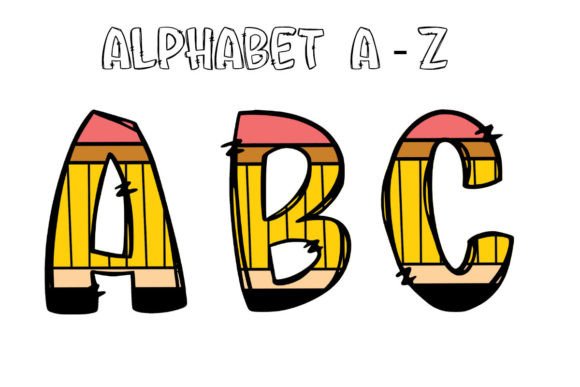
Back to School Alphabet 3: A Practical Evaluation for Designers and Educators
Back to School Alphabet 3 is a digital download consisting of 36 high-resolution PNG files: 26 uppercase letters (A–Z) and 10 numerals (0–9). Each file is delivered at 300 DPI with a transparent background, optimized for sublimation printing and other print-on-demand applications. It is not an editable vector format—no SVG or layered source files are included—and no physical item ships upon purchase.
This product targets users who need ready-to-use, school-themed lettering assets for crafting, classroom decor, event design, or small-batch merchandise. Its naming suggests it is part of a series, but Back to School Alphabet 3 functions independently and does not require prior versions.
Who Might Consider Back to School Alphabet 3?
Three primary user groups commonly evaluate this type of resource:
- Educators and school staff preparing bulletin boards, name tags, welcome signs, or literacy activities;
- Small business owners and crafters producing sublimated mugs, tumblers, tote bags, or framed prints for back-to-school markets;
- Designers and content creators building themed templates for invitations, social media graphics, blogs, or printable planners.
Interest often arises when users seek consistency in visual tone—particularly fonts that evoke academic tradition, cheerfulness, or clean modernity—without investing time in custom typography or licensing fees.
Key Benefits and Realistic Expectations
The main advantage of Back to School Alphabet 3 lies in its immediacy and technical readiness. Files arrive pre-processed: transparent backgrounds eliminate manual clipping; 300 DPI resolution supports sharp output on standard home printers and professional sublimation systems; and uniform sizing across all letters simplifies layout work.
Because the set includes only uppercase letters and numerals—not lowercase, punctuation, or accented characters—it suits projects where brevity and visual impact matter more than full linguistic coverage. For example, creating a “Class of 2025” banner or labeling student supply bins requires only capital letters and numbers, making this set functionally sufficient.
However, users should recognize important tradeoffs. The lack of vector (SVG or EPS) files means scaling beyond original dimensions may introduce pixelation. While 300 DPI is adequate for most print applications up to 8×10 inches, enlarging individual letters for wall decals or large-format signage could compromise clarity. Also, because files are flattened and non-editable, color adjustments must occur in external software before printing—users cannot toggle layers or modify stroke weight directly within the PNGs.
Situations Where Back to School Alphabet 3 Is a Strong Fit
This set performs well in contexts where speed, thematic alignment, and moderate scalability are priorities:
- Creating printed classroom resources such as alphabet charts, sight-word cards, or behavior charts;
- Sublimating short phrases onto ceramic mugs, aluminum water bottles, or polyester mouse pads—especially for school staff gifts or PTA fundraisers;
- Designing digital assets like blog headers, newsletter banners, or Instagram story templates centered around back-to-school timing;
- Producing limited-run party decorations (e.g., “First Day of Kindergarten” photo props) using home cutting machines that accept PNG imports with transparency.
In these cases, the consistent style across all 36 characters helps maintain visual cohesion without requiring font matching or kerning adjustments.
When Alternatives May Be Worth Considering
Users with different project requirements may find other options more suitable. For instance:
- If you need lowercase letters, symbols, or multilingual support, a comprehensive font family—or a scalable vector alphabet pack—offers greater flexibility;
- If your workflow relies heavily on layer-based editing (e.g., changing fill color per letter or applying shadows individually), an SVG or PSD-based set would better accommodate iterative design;
- If you plan frequent reuse across diverse sizes—from tiny labels to 24-inch posters—a true vector format avoids resolution limits entirely;
- If brand alignment is critical (e.g., matching an existing school logo’s typeface), licensing a commercial font with proper usage rights may provide tighter typographic control and legal compliance.
Also, educators sourcing materials for district-wide use should verify whether the license permits redistribution—for example, embedding letters into shared Google Slides templates used by multiple teachers. The listing states the files are “not for editing,” but does not clarify redistribution terms; users should confirm permissions directly with the seller if institutional use is intended.
Making a Practical Decision
To determine whether Back to School Alphabet 3 aligns with your needs, ask three questions:
- What is the largest physical or digital size I’ll need each letter to appear at? If outputs stay under 10 inches wide, the 300 DPI PNGs will likely meet quality expectations. Larger formats warrant vector alternatives.
- Do I need typographic variety—or just reliable, on-brand consistency? This set delivers uniformity, not stylistic range. If your project calls for bold, italic, or outlined variants, additional assets or manual effects will be necessary.
- How much time do I have to prepare, and what tools am I using? Users comfortable with basic image editors (e.g., Canva, Photoshop, GIMP) can integrate these PNGs quickly. Those relying solely on word processors or platforms with limited image handling may face formatting constraints.
Finally, consider cost-effectiveness relative to effort. Purchasing a single-use PNG pack makes sense for one-off seasonal projects. But if you regularly produce educational or promotional materials, investing in a versatile, licensable font—or building a reusable asset library—may reduce long-term overhead.
In summary, Back to School Alphabet 3 serves a specific, practical niche: users seeking fast, printable, thematically appropriate lettering for school-related design tasks. Its value emerges not from novelty or customization, but from reliability, clarity, and purpose-built utility. Evaluating it alongside your actual workflow, output requirements, and licensing context—not just aesthetic appeal—leads to the most informed choice.